Data Center Fabric Labs
21 broken leaf-spine fabrics to fix, from MLAG and the BGP, OSPF and IS-IS underlay to VXLAN, EVPN, symmetric IRB and multihoming. Every lab was built and tested on Arista cEOS-lab 4.37 and runs in GNS3.
What’s inside
Practice, structured like a course.
21 hands-on labs
A ticket, a topology, constraints and tasks. Then a verification table, the tested solution, common mistakes and review questions.
A primer before every lab
The key ideas and the commands that help, written so they don’t give the faults away.
A 6-week study plan
Built from the topics of Arista’s Data Center Engineering exam, with a progress tracker and a redo list for the labs you found hard.
Ready-made lab files
The starting configuration of every switch, GNS3 projects that open straight into the broken fabric, and a small server container with LACP bonding, ping, tcpdump and Python.
From layer 2 to EVPN
21 labs in seven modules.
The modules follow the topic list of Arista’s Data Center Engineering exam, a hands-on lab exam. CloudVision isn’t free to run, so it has no lab: the study plan lists it with the other topics to cover in your main study source.
Layer 2 leaf-spine
5 labs · VLANs and trunks, spanning tree, LACP, MLAG and VRRP
- 01VLANs and Trunks: The Server VLAN That Only Works on One Leaf
- 02Spanning Tree: The Leaf That Became Root
- 03LACP: The Second Link That Took the Server Offline
- 04MLAG: The Pair That Never Became a Pair
- 05VRRP: Two Gateways, One Address
Layer 3 underlay
5 labs · eBGP, ECMP, OSPF and IS-IS underlays, and MTU
- 06eBGP Underlay: The Leaf That Never Peered
- 07ECMP: Two Spines, One Path
- 08OSPF Underlay: The Leaf With Three Problems
- 09IS-IS Underlay: The Leaf Nobody Hears
- 10MTU: The Packets That Vanish Between Racks
VXLAN
2 labs · Static VXLAN and MLAG with a shared VTEP
- 11Static VXLAN: The Flood List and the VNI
- 12MLAG and VXLAN: One Pair, Two VTEPs
EVPN
5 labs · Overlay peering, route targets, symmetric and asymmetric IRB, border leaf
- 13EVPN Overlay Peering: Sessions That Never Come Up
- 14Route Targets: The VLAN Nobody Imports
- 15Symmetric IRB: Routes Nobody Imports
- 16Asymmetric IRB: Every Leaf Needs Every VLAN
- 17Border Leaf: The Default Route the Fabric Never Got
EVPN multihoming
1 lab · Ethernet segments, route types 1 and 4, designated forwarder
- 18EVPN Multihoming: One Server, Two Segments
Operations and automation
2 labs · Checkpoints and commit timers, eAPI and JSON
- 19Safe Changes: Checkpoint and Commit Timer
- 20eAPI and JSON: The Script That Cried Wolf
Capstone
1 lab · Several faults across a whole EVPN-VXLAN fabric
- 21Capstone: Rack 3 Can't Reach the Database
From Lab 04
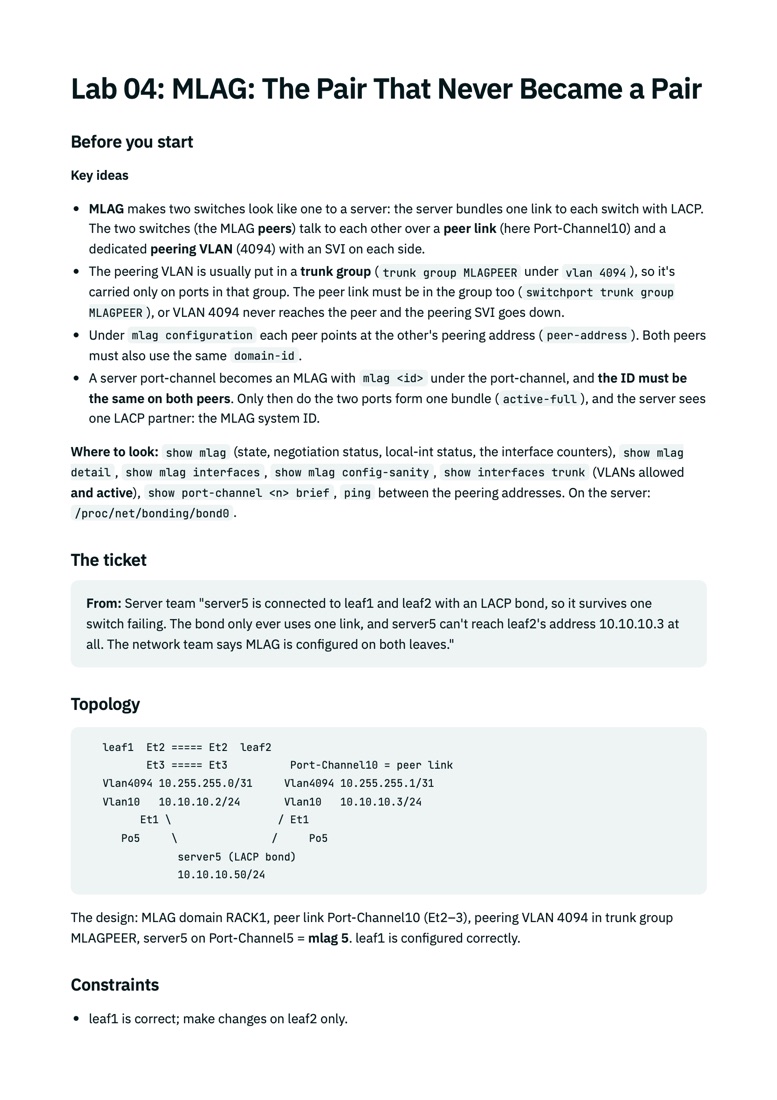
An MLAG pair that never became a pair.
“The bond only ever uses one link, and server5 can’t reach leaf2’s address at all. The network team says MLAG is configured on both leaves.”
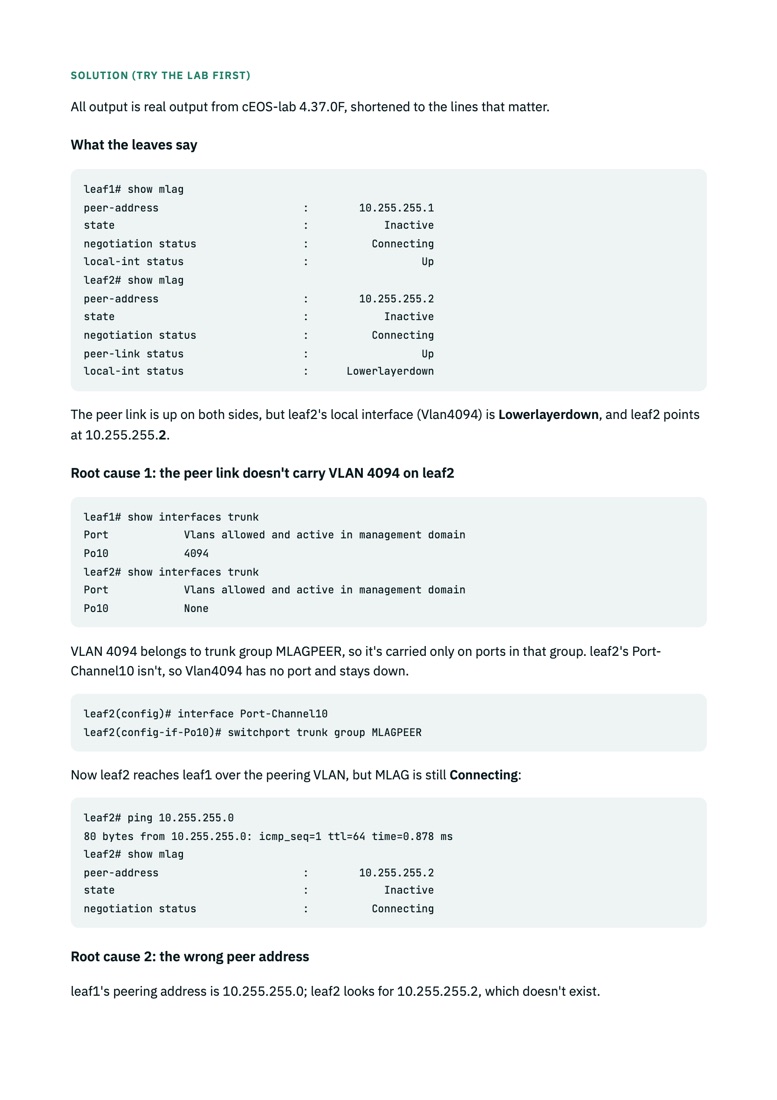
leaf2# show mlag
state              : Inactive
negotiation status : Connecting
peer-link status   : Up
local-int status   : Lowerlayerdown
Real output from the lab, cEOS-lab 4.37 (spacing shortened). The peer link is up, so why is MLAG down?
See inside
Real pages from the workbook.
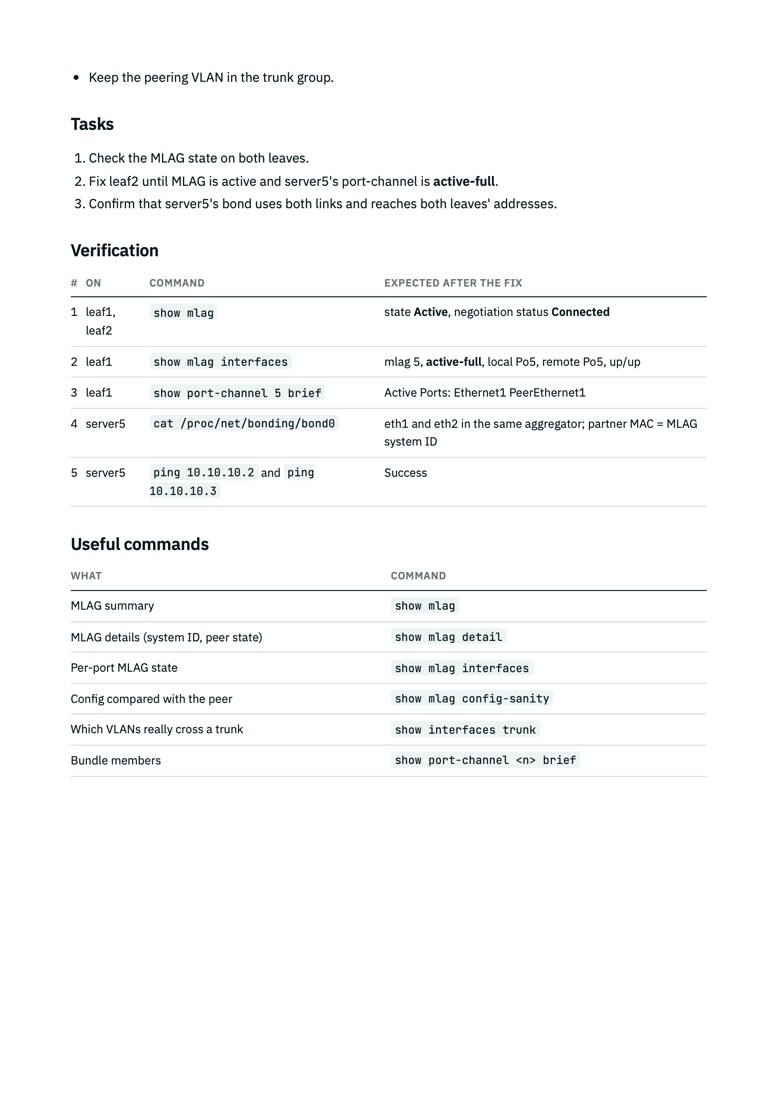
Lab 04 (MLAG), one of the free labs, exactly as it appears in the PDF. Click a page to see it full size.
What you need
GNS3, a free Arista image and enough memory.
- GNS3 3.0, free, on Windows, macOS or Linux, with Docker on the GNS3 server (the GNS3 VM already has it).
- Arista cEOS-lab 4.37, free from arista.com. You need an Arista account, and Arista doesn’t accept free email addresses such as Gmail for it. The image isn’t included in the course: Arista licenses it to you directly.
- Memory: plan about 3 GB per switch on the GNS3 server: 12 GB for the labs with up to 3 switches, 16 GB for the 4-switch labs. The free sample includes 4-switch labs, so you can check your computer first.
- A one-time setup of about an hour: import the image and build the small server container with one script. The guide at the front of the workbook walks you through it.
- Prior knowledge at CCNP level (VLANs, STP, OSPF and BGP), plus a main study source for the theory.
Data Center Fabric Labs
Launch price. It goes up to €39 once the first reviews are in.
One-time payment, EU VAT included. Free updates to the labs.
- 21 labs with tested solutions (PDF workbook)
- Primers, study plan and progress tracker
- Starting configs and GNS3 projects for every lab, plus the server container
- 14-day refund if it isn’t for you
Secure checkout by Payhip. Tested on Arista cEOS-lab, then reviewed and verified by a CCNP Enterprise-certified network engineer.
Questions
Is this official Arista material?
No. Tier Two Labs is independent and not affiliated with or endorsed by Arista Networks. The labs are original, written from Arista’s public exam topics and tested on cEOS-lab. None of it comes from real exam content.
Why cEOS-lab?
cEOS-lab is EOS itself, packaged as a container. It’s free to download, starts quickly and runs real EOS code, so the commands and output are the ones you see on Arista switches.
Does it cover every exam topic?
It covers the configuration and troubleshooting topics with hands-on labs: layer 2 leaf-spine, the layer 3 underlay, VXLAN, EVPN and EVPN multihoming, plus safe changes and eAPI. CloudVision, iBGP underlay designs and BFD have no lab of their own; the study plan lists them so you can cover them in your main study source.
Do I get the solutions?
Yes. Every lab has a full solution with the root causes, the fixes and the real output before and after. In the PDF, solutions start on a new page so you don’t see them by accident.
Will it run on my Mac?
Yes. The setup guide covers Apple Silicon Macs (a GNS3 server in an OrbStack Linux VM), Intel Macs, Windows and Linux. All the labs were tested on an Apple Silicon Mac. Plan for the memory above, and try the free labs first.
Who checks the labs?
Every lab is replayed on cEOS-lab 4.37: the faults are confirmed, the fixes from the solution are applied and the verification checks are run, then the same again in GNS3 from the download you get. Then each lab is reviewed and verified by a CCNP Enterprise-certified network engineer.