CCNA Troubleshooting Labs
32 broken networks to fix, from subnetting and VLANs to OSPF, NAT, DNS, AAA and Ansible, covering all five domains of the new 200-301 CCNA v2.0 exam (from 3 February 2027). Every lab was built and tested in GNS3, the Cisco devices on IOS XE 17.18.
What’s inside
Practice, structured like a course.
32 hands-on labs
A ticket, a topology, constraints and tasks. Then a verification table, the tested solution, common mistakes and review questions.
A primer before every lab
The key ideas, the numbers to know and the commands that help, written for CCNA level and so they don’t give the faults away.
An 8-week study plan
Mapped to Cisco’s official exam weights, with a progress tracker and a redo list for the labs you found hard.
Ready-made lab files
The complete base configurations for every device, GNS3 projects that open straight into the broken network, and one Linux container that plays the laptop, web, DNS, AAA, file, syslog, SNMP and Ansible machines.
All five exam domains
32 labs across the five exam domains.
The percentages are Cisco’s official weights for each domain. Topics you can only describe, such as wireless principles, IPsec VPNs and virtualization, aren’t labs: the study plan lists them so you can cover them in your main study source.
1.0 Network Infrastructure and Connectivity
25%5 labs · Interfaces, IPv4 and IPv6 addressing, client troubleshooting and DHCP
- 01Interfaces: Down, Disabled and Half Duplex
- 02IPv4 Addressing: The Subnet That Wasn't There
- 03IPv6 Addressing: The Hosts That Never Got an Address
- 04Client Connectivity: It Works on Everyone's Laptop but Mine
- 05DHCPv4: Nobody Gets an Address
2.0 Switching and Network Access
25%9 labs · VLANs, trunks, EtherChannel, inter-VLAN routing, edge ports, CDP/LLDP, Rapid PVST+ and the troubleshooting toolkit
- 06VLANs and Access Ports: The Printer, the Camera and the PC
- 07802.1Q Trunks: Three Uplinks, Three Problems
- 08EtherChannel: Half the Links, Half the Bandwidth
- 09Inter-VLAN Routing: The Gateways That Wouldn't Route
- 10Edge Ports: The Phone, the Access Point and the Hypervisor
- 11CDP and LLDP: The Diagram Is Wrong
- 12Rapid PVST+: The Access Switch That Became Root
- 13STP Protection: PortFast, BPDU Guard, Root Guard and Loop Guard
- 14Troubleshooting Tools: One Ticket, Five Tools
3.0 IP Routing
20%6 labs · The routing table, IPv4 and IPv6 static routes, OSPFv2, OSPFv3, HSRP and VRRP
- 15The Routing Table: Why Did the Router Choose That Path
- 16IPv4 Static Routes: The Backup That Was Always On
- 17IPv6 Static Routes: Link-Local Next Hops and a Backup That Points Nowhere
- 18OSPFv2: The Duplicate, the Wrong DR and the Half-Point-to-Point Link
- 19OSPFv3: The IPv6-Only Router With No Name
- 20HSRP and VRRP: Reading Who Is Really the Gateway
4.0 Network Services and Security
20%7 labs · AAA, SCP/SFTP, NAT, DNS records, ACLs, DHCP snooping, DAI, port security and RA guard
- 21AAA: RADIUS, TACACS+ and the Admin Who Got User Mode
- 22SCP and SFTP: The Backup Job That Never Ran
- 23NAT and PAT: The Third User Never Gets Online
- 24DNS Records: The Website Is Down and the Mail Bounces
- 25IPv4 ACLs: The Filter That Blocked the Wrong People
- 26DHCP Snooping and DAI: The Rogue Server and the Silent Printer
- 27Port Security and RA Guard: Locked Ports and a Rogue Router
5.0 AI, and Network Operations and Management
10%4 labs · Syslog, SNMP, Ansible and checking AI suggestions
- 28Syslog: The Messages That Never Arrived
- 29SNMP: What the Monitoring System Can't See
- 30Ansible: The Playbook That Changed Nothing
- 31AI in Network Operations: Check the Assistant Before You Trust It
Capstone
1 lab · Three tickets across VLANs, DHCP, OSPF and NAT
- 32Capstone: Branch Office Day
From Lab 07
The configuration says trunk. The switch disagrees.
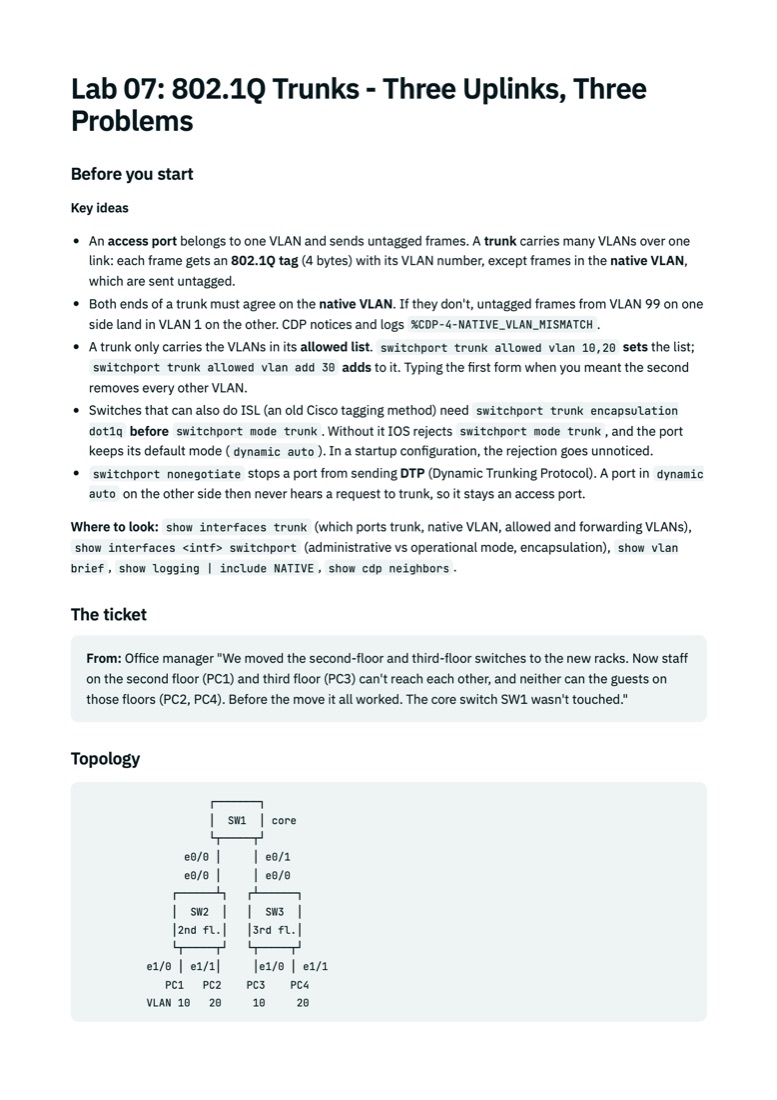
“We moved the second-floor and third-floor switches to the new racks. Now staff on the second floor and third floor can’t reach each other, and neither can the guests on those floors. Before the move it all worked.”
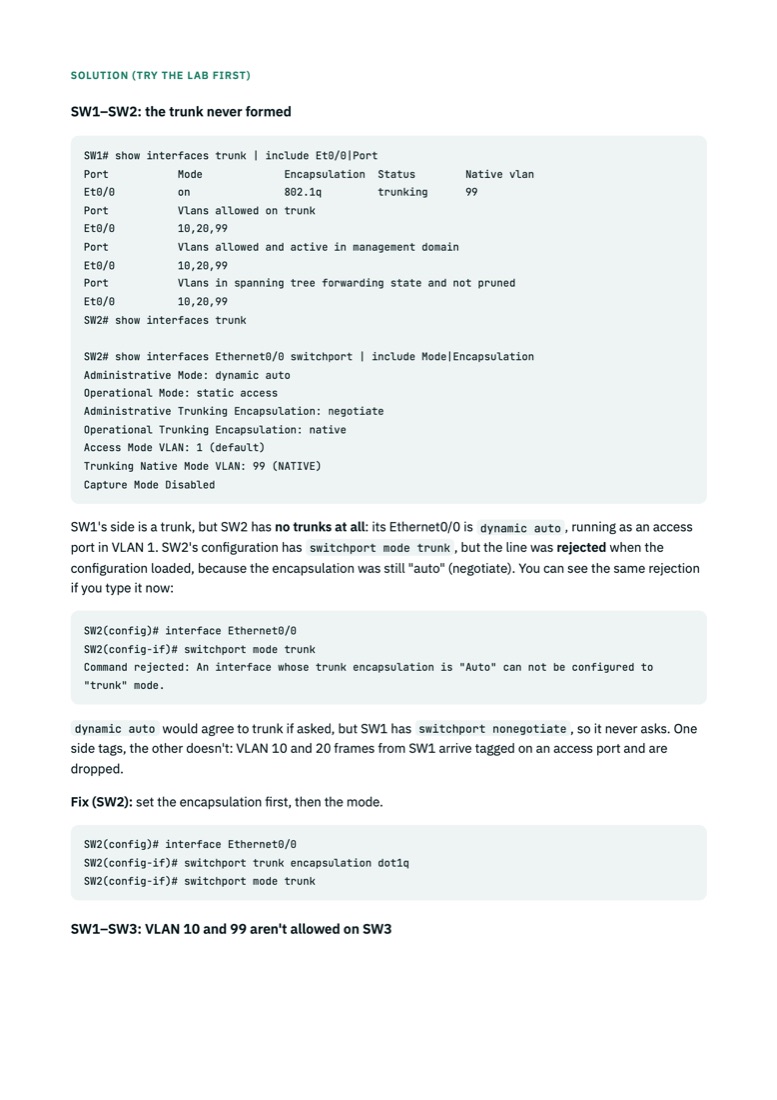
SW2# show interfaces Ethernet0/0 switchport | include Administrative Mode|Operational Mode
Administrative Mode: dynamic auto
Operational Mode: static access
Real output from the lab, IOS XE 17.18. Its startup configuration says switchport mode trunk. Where did it go?
See inside
Real pages from the workbook.
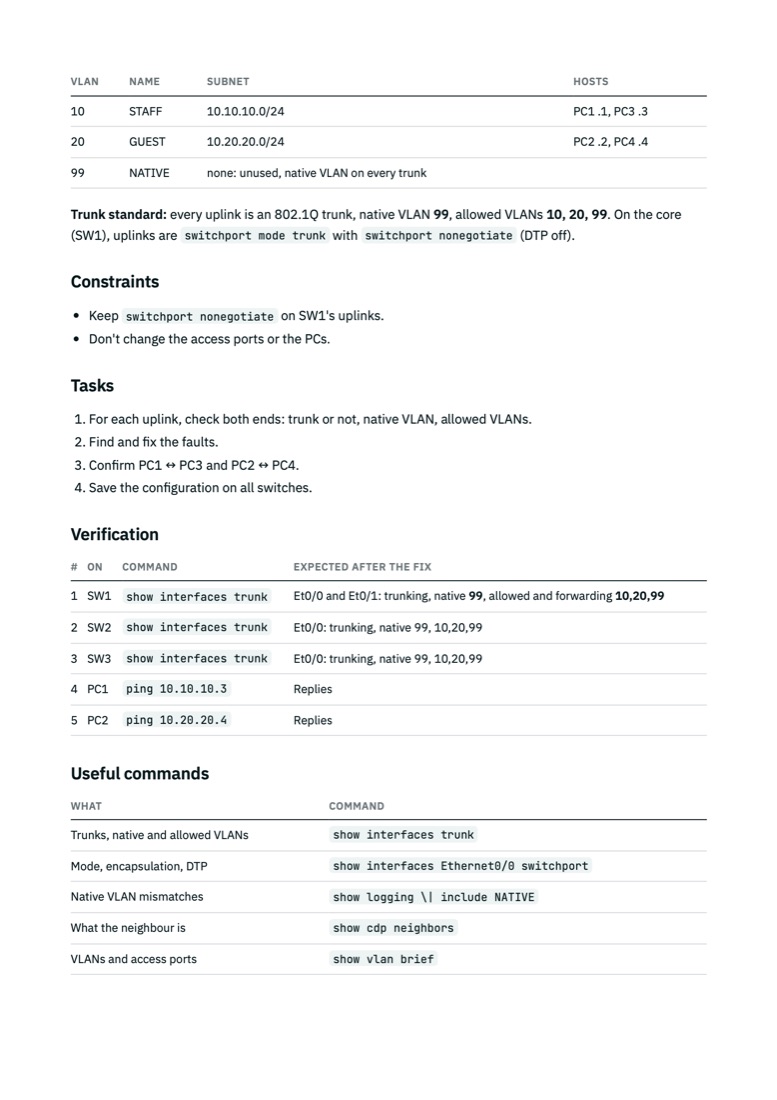
Lab 07 (802.1Q trunks), one of the free labs, exactly as it appears in the PDF. Click a page to see it full size.
What you need
A laptop and free software.
- GNS3, free, on Windows, macOS or Linux.
- Cisco IOL images (IOS XE 17.x). They come with Cisco Modeling Labs Free, which you download from Cisco. Images aren’t included in the course: Cisco licenses them to you directly.
- A normal laptop. IOL routers and switches run as lightweight processes, much lighter than full router VMs.
- Docker on your GNS3 server for 8 of the 32 labs (the Linux client, AAA, SCP/SFTP, DNS, ACL, syslog, SNMP and Ansible labs). A script builds the lab container once (5–15 minutes, needs internet). The GNS3 VM already has Docker.
- Your main CCNA study source, such as the official cert guide or a video course. The primers recap each topic; they don’t replace it.
CCNA Troubleshooting Labs
Launch price. It goes up to €39 once the first reviews are in.
One-time payment, EU VAT included. Free updates for the 200-301 v2.0 exam.
- 32 labs with tested solutions (PDF workbook)
- Primers, study plan and progress tracker
- Base configs and GNS3 projects for every lab, plus the lab container
- 14-day refund if it isn’t for you
Secure checkout by Payhip. Reviewed and verified by a CCNP Enterprise-certified network engineer.
Questions
Are these real exam questions?
No, and that’s on purpose. Every lab is original, written from Cisco’s public exam topics. Using leaked exam content breaks Cisco’s exam agreement and can cost you your certification.
Why IOL and not Packet Tracer?
Packet Tracer only simulates IOS and lacks many features, and its output often differs from a real device. IOL runs real IOS XE code, so the output you see is real IOS XE output. Where IOL behaves differently from hardware, the lab says so.
Is it for CCNA v1.1 or v2.0?
It follows the CCNA v2.0 exam topics, which apply from 3 February 2027. Almost every lab topic is also in v1.1, so it works for both; the labs on Linux clients, DNS records, AAA, SCP/SFTP, Ansible and AI cover what v2.0 added.
Does it cover every CCNA topic?
It covers all five exam domains with hands-on labs, but not every single topic. Some only ask you to describe, such as wireless principles, IPsec VPNs, virtualization and network management approaches. A few can’t be practised in GNS3: Wi-Fi, PoE and storm control, and IOL doesn’t emulate DHCP snooping’s filtering or the voice VLAN’s traffic. The labs explain these where they fit, and you still configure and check them. The study plan lists every topic without a lab.
Do I get the solutions?
Yes. Every lab has a full solution with the root cause, the fix and the real output before and after. In the PDF, solutions start on a new page so you don’t see them by accident.
Is this enough to pass the exam?
It’s the practice half. Use it with a book or video course for the theory. Nobody can promise you a pass, and we won’t.
Who checks the labs?
Every lab is tested in GNS3: the Cisco devices on IOS XE 17.18, the server side on real Linux software (BIND, FreeRADIUS, tac_plus-ng, OpenSSH, rsyslog, Net-SNMP, Ansible). Then each lab is reviewed and verified by a CCNP Enterprise-certified network engineer who works with Cisco, Fortinet, Palo Alto, Juniper and Aruba networks.